 Eric's ramblings, experiences and random thoughts about e-Learning, distance education and Educational Technology.
Tuesday, November 07, 2006
ISBNs get even longer!
A colleague of mine (thanks Ann!!!) came across the fact that as of January 2007, all ISBNs will be changing from a 10-digit to 13-digit number. That's the first I've heard of this. Strange that publishers aren't advertising this more prominently? The Book Industry Study Group's website documents this new development with several resources including a nice recorded webinar hosted by John Abraham. (Be careful... it's detailled!!! hahaha) It's free to view the webinar but does require users to fill in an annoying form (joy!).


The Death of Thomson Learning?
A major player in the education market is selling off their educational unit: Thompson Corporation. In a recent press release on their website, they state that despite being a profitable unit, their educational unit is being sliced into several sections and these sections are being sold via a competitive bidding process. Lets hope that the result is not the expiration of many useful textbooks in the higher education market. Cross your fingers!
Thursday, October 12, 2006
Are you a Teacher who needs more Google?
If so, then this will be right up your alley. Via Stephen Downes' OLDaily newsletter, I learned that Mark Wagner has published the entire first issue of the Google Teacher Newsletter on his blog. If you want to subscribe to future newsletters in the series, simply visit http://www.google.com/educators and they'll be delivered directly to your inbox. That way you can monitor what Google is doing to entice teachers to use its products (*smile*).
Tuesday, October 10, 2006
Google buys YouTube
A recent story on CBC's website shows that Google has purchased YouTube, the popular video hosting service, for a whopping $1.65 billion US. Is it just me or does this sound like a lot of money to buy such a small company that has not shown any profitability yet? Hmmm...Interesting. I've written about the potentially interesting pedagogical aspects of video file sharing services like Google Video and YouTube on this blog before. Obviously, the executives at Google also think YouTube has a huge upside. Will Google Video swallow YouTube? Or with they keep the widely publicized "YouTube" name? Stay tuned on what they do with YouTube and Google Video, and how they turn these video file sharing services into a money maker.
Hint: Yesterday YouTube stated it has recently signed deals with CBS, Universal Music Group and Sony BMG Music Entertainment to distribute video content online. It signed a similar deal with Warner Music Group last month.
Hint: Yesterday YouTube stated it has recently signed deals with CBS, Universal Music Group and Sony BMG Music Entertainment to distribute video content online. It signed a similar deal with Warner Music Group last month.
Friday, September 22, 2006
Wikipedia for the classroom
I hope it's not a secret that I am a supporter of Wikipedia. This is not the first time I write about Wikipedia here (see this). I was reading Stephen Downes' OLDaily this morning and he writes about having come across a page on Wikipedia that offers guidance to teachers on how to use Wikipedia in the classroom.
The page is called Wikipedia: School and university Projects. It offers many useful learning activities that can be facilitated by Wikipedia and the aspect that I find most valuable is that it lists many current and past scholastic projects mediated by Wikipedia. Some of the participants are heavyweight schools too. (i.e. UofC Irvine, Penn State, U of Hong Kong, etc.).
There is one Canadian school on list (as of Sept 22nd, 2006), the Northern Alberta Institute of Technology (NAIT). In Fall 2005, "as part of BAI530, a Leadership course in the Bachelor of Applied Information Systems Technology program, students are required to participate in group community service projects of at least 10 hours of work [...] five students opted to use those 10 hours contributing to Wikipedia."
As regular Wikipedia user, I find that type of learning activity pretty neat!
The page is called Wikipedia: School and university Projects. It offers many useful learning activities that can be facilitated by Wikipedia and the aspect that I find most valuable is that it lists many current and past scholastic projects mediated by Wikipedia. Some of the participants are heavyweight schools too. (i.e. UofC Irvine, Penn State, U of Hong Kong, etc.).
There is one Canadian school on list (as of Sept 22nd, 2006), the Northern Alberta Institute of Technology (NAIT). In Fall 2005, "as part of BAI530, a Leadership course in the Bachelor of Applied Information Systems Technology program, students are required to participate in group community service projects of at least 10 hours of work [...] five students opted to use those 10 hours contributing to Wikipedia."
As regular Wikipedia user, I find that type of learning activity pretty neat!
Monday, August 14, 2006
YouTube and Google Video
Have you seen YouTube? It’s a site where anyone can freely upload a video file of up to 100 Mb in size and a maximum length of 10 minutes per video. In fact, a user can upload an unlimited number of these videos!!! The website freely hosts your video and visitors can come and view them. Similar services exist such as Google Video. Unlike YouTube, it has no size/length restrictions but it does require a Google account. These video hosting services work great. Try them. Just browse around serching for key words. You'll see some pretty informative, entertaining and creative examples of home made videos.
So why am I posting this to e-Learning Acupuncture? Well, digital storytelling has been an established learning activity for a couple of years now. With the arrival of free video hosting sites such as YouTube and Google Video, the hosting problem for Digital Storytelling files by students is technically solved. Students could create their videos and upload them to YouTube or Google Video easily. This hosting server relieves any server load pressures caused by large Digital Storytelling videos on a school’s LMS server. That’s a good thing. Still unconvinced? Check out one example of a lovely digital storytelling project created by grade 5 and 6 students at Saxlington Public School in England (make sure to turn on your speakers). After viewing the video consider how useful this free hosting site is for children at this school. They can share a simple URL with their parents, grandparents, cousins and friends, and everyone can see the fruits of their labour. Very cool!!! If you have any examples to share of your digital story projects and how they are freely hosted on the Internet, please leave a comment by clicking below.
So why am I posting this to e-Learning Acupuncture? Well, digital storytelling has been an established learning activity for a couple of years now. With the arrival of free video hosting sites such as YouTube and Google Video, the hosting problem for Digital Storytelling files by students is technically solved. Students could create their videos and upload them to YouTube or Google Video easily. This hosting server relieves any server load pressures caused by large Digital Storytelling videos on a school’s LMS server. That’s a good thing. Still unconvinced? Check out one example of a lovely digital storytelling project created by grade 5 and 6 students at Saxlington Public School in England (make sure to turn on your speakers). After viewing the video consider how useful this free hosting site is for children at this school. They can share a simple URL with their parents, grandparents, cousins and friends, and everyone can see the fruits of their labour. Very cool!!! If you have any examples to share of your digital story projects and how they are freely hosted on the Internet, please leave a comment by clicking below.
Friday, July 21, 2006
Still wondering about Wikis?
When you hear the word “Wiki” are you still a bit confused? In Hawaiian “wiki” means “quick” and if you need to know more than that there are a lot of good tutorials available on the web. A useful one that I recently came across, that is available in QuickTime video, can be found here. Meredith Farkas, Distance Learning Librarian, Norwich University, does a great job at explaining wikis in general as well as demonstrating several different applications. The archived presentation carries a “library” focus but don’t let that dissuade you, Meredith does a good job showing you some best practices in wiki usage and discusses software choices. Definitely worth a look if you haven’t used a wiki before. Mederith has also posted her slides in PDF format.
The largest application of a wiki is Wikipedia.org and if you are interested in that check out a previous posting I’ve made on the topic.
The largest application of a wiki is Wikipedia.org and if you are interested in that check out a previous posting I’ve made on the topic.
Wednesday, July 05, 2006
iPod as a training aid in sports
A colleague of mine sat down in my cubicle this morning and told me about a recent story where Major League Baseball pitchers are using the iPod Video to review video of opposing batters from previous games. A quick search found this article online. Why am I posting a baseball story on this e-learning blog? Because it is clear to me that the iPod is being used as a training aid in the case of the baseball pitchers and those using it say they like it as well. As this quotation from the article demonstrates, the same reasons why iPods are useful in distance education drive the reasons why iPods are useful in this sports setting:
"They can do it on their time, they don't have to be here or they don't have to be behind a desk watching a laptop. They can be at home, on the airplane or even in their locker," Rockies video coach Mike Hamilton said.
We’ve often heard reports of the iPod having numerous applications as an educational tool in formal education settings and it’s nice to see this overlapping into other areas such as training aids. This portable iPod technology has potential for future developments that are very relevant to distance education. Stay tuned to what they think of next! In the meantime, instructors should practice their podcasting skills (*grin*).
"They can do it on their time, they don't have to be here or they don't have to be behind a desk watching a laptop. They can be at home, on the airplane or even in their locker," Rockies video coach Mike Hamilton said.
We’ve often heard reports of the iPod having numerous applications as an educational tool in formal education settings and it’s nice to see this overlapping into other areas such as training aids. This portable iPod technology has potential for future developments that are very relevant to distance education. Stay tuned to what they think of next! In the meantime, instructors should practice their podcasting skills (*grin*).
Thursday, June 29, 2006
Case Studies in Science
Teachers, professors and instructional designers working in the science field are going to LOVE this resource. The State University of New York at Buffalo is maintaining a bank of Case Studies for Science. It's faily large and includes teaching notes for each case. Also, each case has an answer key that is accessible by registered instructors. It is definitely worth a look! I find this repository excellent! If you know of any other similar repositories for case studies please let us know by clicking "comments" below.
Wednesday, June 28, 2006
TED Talks
I've seen this referred to on a few other blogs recently and I hesitated to post it here for fear of too much duplication for the edublog surfers out there; however, after watching a few TED Talks I decided that it’s too good to pass up. This is the first I hear of the TED conference: Technology, Entertainment and Design. Six TED talks/videos have been posted online from these speakers: Al Gore, Sir Ken Robinson, Tony Robbins, Majora Carter, Hans Rosling and David Pogue. Ken Robinson’s might carry the most appeal to readers of this blog because his talk is on education; however, they are all worth taking in. So book yourself some time, maybe on your lunch hour, put your feet up and watch these talks. They are great!
Monday, June 26, 2006
Assessments in web-enabled courses
As an Instructional Designer with an interest in technology-enabled courses, colleagues have often asked me: “What type of assessments can I use in my web-enabled courses?” Of course, there is no perfect answer to this question; however, there are a couple of good places to start exploring the issue. One spot worth visiting is the Journal of Learning, Technology and Assessment. This free online journal publishes refereed articles directly on this subject. Although less than prolific, it published only eight articles in 2005, many of the articles are useful.
For example, the most recent article is entitled: Computer-Based Assessment in E-Learning: A Framework for Constructing "Intermediate Constraint" Questions and Tasks for Technology Platforms. It gives a good overview of a taxonomy of assessment types for web-enabled use. I find it useful because it gives 28 different examples that instructors can relate to. It’s not a panacea; however, it certainly functions well as a seed for ideas. Be sure to check it out and if you know any other good sources of ideas on this subject then please leave a comment by clicking the 'comments' word below.
For example, the most recent article is entitled: Computer-Based Assessment in E-Learning: A Framework for Constructing "Intermediate Constraint" Questions and Tasks for Technology Platforms. It gives a good overview of a taxonomy of assessment types for web-enabled use. I find it useful because it gives 28 different examples that instructors can relate to. It’s not a panacea; however, it certainly functions well as a seed for ideas. Be sure to check it out and if you know any other good sources of ideas on this subject then please leave a comment by clicking the 'comments' word below.
Monday, June 19, 2006
Concept Maping using CmapTools
I attended a great talk on June 7th entitled, Using Concept Mapping and Problem-Based Learning to Encourage Meaningful Learning (presentation archived here). It was delivered as part of the TeachU series offered through the Ohio Learning Network. The presentation was by Ellen Lynch, Tracy Herrmann, and Margaret Cheatham at the University of Cincinnati.
I really enjoyed the way the way they introduced the use of their concept mapping software of choice: cmap tools. I had never used this free software before and seeing it in action in this setting really peaked my interest. So I downloaded it the next day and I tried it for myself. It really is easy to use. Ellen and Tracy describe many ways in which they used concept mapping to create meaningful learning in their students. The one way that they described that I really liked was to use two concept mapping activities as a way for students to validate their own learning. Prior to a term beginning, or prior to a unit beginning, students are asked to a create a concept map describing what they know about the subject. At the end of the term, or unit, students create a new concept map depicting what they know about the subject. In the second concept mapping exercise, Ellen, Tracy and Margaret invariably see that students demonstrate far more knowledge and that they are able to show relationships between related topics. This rings true to me. I’ve never done a concept mapping exercise as they describe; however, I have used pre- and post-testing and I have seen dramatic results. One of my interests about concept mapping is that this thoughtful, and thought provoking, activity can demonstrate relationships between concepts. It’s not simply a regurgitation of facts. Students must demonstrate higher cognitive levels of thought by analyzing, synthesizing and evaluating the knowledge they have gained during the term or unit.
Just to prove it to myself, I have made two concept maps using the cmaps tools. By the way, they neatly export into JPEG format. Nice! The first concept map would be a typical concept map created by a 1st year university student on the first day of class. The class I taught last Fall was called Fundamentals of Teaching Adults. If I were to give them a short tutorial on what concept mapping was, then give them the title of the course, and then ask them to create a concept map covering the major areas in this course they might come up with something simple like this (click to enlarge):

And at the end of the course, if they were to repeat the exercise they might create concept maps that come closer to this more complicated map (click to enlarge):
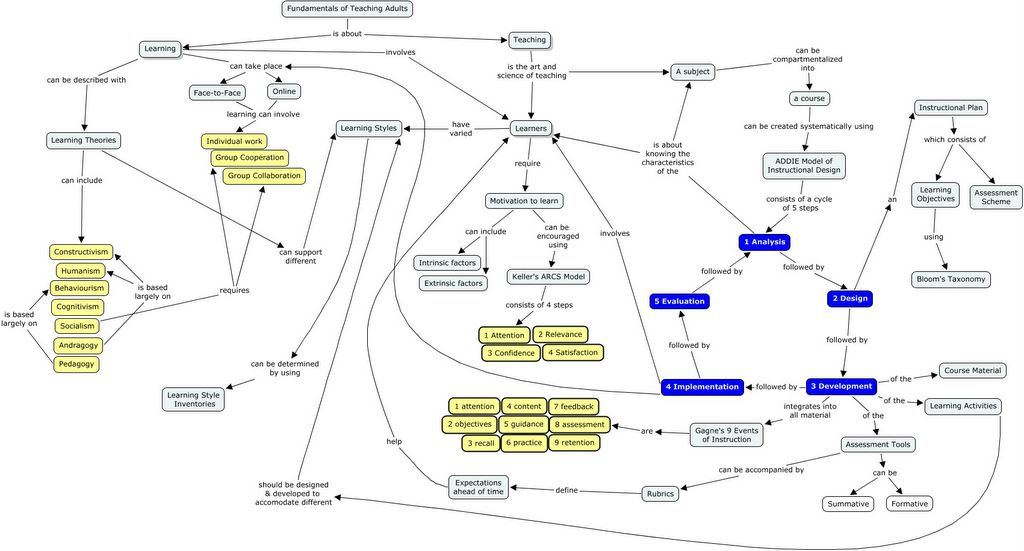
Clearly a student who can prepare a complex concept map showing how parts of the course interrelates with each other is showing understanding of the concepts. It’s an excellent post-learning activity. Another facet of this that I like a lot is that there is an element of creativity built in. It is likely that if you conducted this activity with a large class, that you would get several creative designs to the concept map. As an instructor, examining some of the concept maps created by students might just open new ways of thinking about the material for myself. That can be a wonderful side effect! I’m going to try this in the Fall term with a Chemistry course I’m teaching. I’ll be sure to report back here on how the activity went.
If you have any interesting ideas about concept mapping, feel free to share them in a comment by clicking the ‘comments’ word below.
I really enjoyed the way the way they introduced the use of their concept mapping software of choice: cmap tools. I had never used this free software before and seeing it in action in this setting really peaked my interest. So I downloaded it the next day and I tried it for myself. It really is easy to use. Ellen and Tracy describe many ways in which they used concept mapping to create meaningful learning in their students. The one way that they described that I really liked was to use two concept mapping activities as a way for students to validate their own learning. Prior to a term beginning, or prior to a unit beginning, students are asked to a create a concept map describing what they know about the subject. At the end of the term, or unit, students create a new concept map depicting what they know about the subject. In the second concept mapping exercise, Ellen, Tracy and Margaret invariably see that students demonstrate far more knowledge and that they are able to show relationships between related topics. This rings true to me. I’ve never done a concept mapping exercise as they describe; however, I have used pre- and post-testing and I have seen dramatic results. One of my interests about concept mapping is that this thoughtful, and thought provoking, activity can demonstrate relationships between concepts. It’s not simply a regurgitation of facts. Students must demonstrate higher cognitive levels of thought by analyzing, synthesizing and evaluating the knowledge they have gained during the term or unit.
Just to prove it to myself, I have made two concept maps using the cmaps tools. By the way, they neatly export into JPEG format. Nice! The first concept map would be a typical concept map created by a 1st year university student on the first day of class. The class I taught last Fall was called Fundamentals of Teaching Adults. If I were to give them a short tutorial on what concept mapping was, then give them the title of the course, and then ask them to create a concept map covering the major areas in this course they might come up with something simple like this (click to enlarge):

And at the end of the course, if they were to repeat the exercise they might create concept maps that come closer to this more complicated map (click to enlarge):
Clearly a student who can prepare a complex concept map showing how parts of the course interrelates with each other is showing understanding of the concepts. It’s an excellent post-learning activity. Another facet of this that I like a lot is that there is an element of creativity built in. It is likely that if you conducted this activity with a large class, that you would get several creative designs to the concept map. As an instructor, examining some of the concept maps created by students might just open new ways of thinking about the material for myself. That can be a wonderful side effect! I’m going to try this in the Fall term with a Chemistry course I’m teaching. I’ll be sure to report back here on how the activity went.
If you have any interesting ideas about concept mapping, feel free to share them in a comment by clicking the ‘comments’ word below.
Wednesday, May 31, 2006
Web-based Objectives Builder
When I first started teaching at the post-secondary level I was introduced to Bloom's Taxonomy. It was a rocky relationship in the early days because I really didn't "get it." Once I started designing courses of my own, I realized more and more the importance of using a systematic approach to developing performance-based objectives (e.g., observable and measurable). James Basore from Golden Gate University in San Francisco has developed a Flash-based Tutorial and Web-based tool that can help instructors and course designers to understand how to formulate performance-based objectives using Bloom's Taxonomy. For those that are embarking upon their first course design project, or for those who need a little refresher,this is a great tutorial. Check it out and kudos to James!
Tuesday, May 30, 2006
EduTechnology is Mainstream
Technology that is common to EduTechnologists has been entering the vernacular of mainstream society for years. If you are unconvinced, you could simply turn to these recent vocabulary winners. Do these sound familiar? (*grin*)
People wouldn't bat an eye if they heard this sentence today: "Just Google me to find my Blog and you'll be able to check out my recent Podcast." (*smile*) Five years ago people would have looked at you like you were an alien from another planet if you said that! Things do change quickly don’t they!
- 2002 - Most Useful Word of the Year - by the American Dialect Society - "Google"
- 2004 - Word of the Year - by the Meriam-Webster Dictionary - "Blog"
- 2005 - Word of the Year - by the New Oxford American Dictionary - "Podcast"
People wouldn't bat an eye if they heard this sentence today: "Just Google me to find my Blog and you'll be able to check out my recent Podcast." (*smile*) Five years ago people would have looked at you like you were an alien from another planet if you said that! Things do change quickly don’t they!
Thursday, May 11, 2006
Pre-registration diagnotic testing
Diagnostic testing prior to registration into a credit course is not a new concept. It's probably most well known in the language arts. For example, testing a student on their oral abilities in their second language with a short interview can quickly allow the professor to recommend which level of course to enrol in. In distance education, one can still do this! There are many examples of this and they can vary in technical complexity from simple self-grading of text-based answers to fully automated graded testing including media such as figures and graphs. Either way works well and accomplishes the goal.
For example, visit the DCE050: Essential Writing Skills course description at the Royal Military College of Canada. On this page is a link to a text-based "threshold test" that students take at their own pace and then they download an answer key to self-grade the test. The course administrator then goes on to write: "If you score below 70% (35 out of 50) on this Threshold Test, we recommend that you enrol in DCE 050 – Essential Writing Skills." Simple to use, easy to understand and there is clear criteria that students can self-assess themselves against. The results are never communicated back to the school, are anonymous in every way and the responsibility for enrolling in the course resides with the student.
Another example can be found in the mathematics department of Athabasca University. Called the Mathematics Diagnostic Evaluation, it is an Authorware-based application that delivers three different difficulty categories of mathematics questions. Each question is multiple-choice, and some questions have visual aids such as figures and graphs, etc. Also, instead of guessing when the student doesn't know the answer they may simply click the skip icon. Like the text-based example at the Royal Military College, this test is simple to use (once you have Macromedia Authorware player installed on your machine). At the end of the test the program calculates a student's score and recommends which mathematics course they should begin with. Another strength of the test is that it then allows students to download all the correct answers if they are interested. One weakness I did notice was the lack of published criteria that students can self-assess themselves against. The algorithm of what score ranges result in what course recommendations would be nice to see. Again, like the text-based test discussed previously, the results in this test are never communicated back to the school, are anonymous in every way and the responsibility for enrolling in the course resides with the student.
In my view, although nothing replaces a useful academic counselling session with a real life body (whether face-to-face or on the phone), both of these tests are highly student-centered and can be valuable tools for the learner in planning their choice of courses at a distance.
For example, visit the DCE050: Essential Writing Skills course description at the Royal Military College of Canada. On this page is a link to a text-based "threshold test" that students take at their own pace and then they download an answer key to self-grade the test. The course administrator then goes on to write: "If you score below 70% (35 out of 50) on this Threshold Test, we recommend that you enrol in DCE 050 – Essential Writing Skills." Simple to use, easy to understand and there is clear criteria that students can self-assess themselves against. The results are never communicated back to the school, are anonymous in every way and the responsibility for enrolling in the course resides with the student.
Another example can be found in the mathematics department of Athabasca University. Called the Mathematics Diagnostic Evaluation, it is an Authorware-based application that delivers three different difficulty categories of mathematics questions. Each question is multiple-choice, and some questions have visual aids such as figures and graphs, etc. Also, instead of guessing when the student doesn't know the answer they may simply click the skip icon. Like the text-based example at the Royal Military College, this test is simple to use (once you have Macromedia Authorware player installed on your machine). At the end of the test the program calculates a student's score and recommends which mathematics course they should begin with. Another strength of the test is that it then allows students to download all the correct answers if they are interested. One weakness I did notice was the lack of published criteria that students can self-assess themselves against. The algorithm of what score ranges result in what course recommendations would be nice to see. Again, like the text-based test discussed previously, the results in this test are never communicated back to the school, are anonymous in every way and the responsibility for enrolling in the course resides with the student.
In my view, although nothing replaces a useful academic counselling session with a real life body (whether face-to-face or on the phone), both of these tests are highly student-centered and can be valuable tools for the learner in planning their choice of courses at a distance.
Tuesday, May 09, 2006
Are you still in the dark about Del.icio.us?
Andy Carvin has written a very readable summary of what Del.icio.us is and how to use it. A must read if you're still in the dark about Del.icio.us. Check it out.
Friday, May 05, 2006
SkypeCasting
Yup.... we've heard of PODcasting... well.... welcome to Skypecasting. I've written about Skype before but there has been a new development. Previous versions of Skype have been limited to 5 users per teleconference; however, the new version is now limited to 100 simultaneous users all being able to access the microphone! WOW! What a mega-teleconference! This is ground breaking in my opinion because it's free. Yup. Free. You could certainly use this in distance education scenarios to host free office hours with the professor or to host a lecture even. Imagine the professor sends out a PowerPoint slide deck to the class and then sets a synchronous time of 10am to meet on Skype. He walks everyone through slide-by-slide using audio and people can ask questions on the fly. Beautiful... and inexpensive!
It's not completely free of bugs as Robin Good reports in a recent product test but the potential to impact distance education especially for small schools with limited budgets is certainly there.
It's not completely free of bugs as Robin Good reports in a recent product test but the potential to impact distance education especially for small schools with limited budgets is certainly there.
Wednesday, May 03, 2006
PODcasting on the Cheap!
I recently went to a talk offered y the University of Hio TeachU series on PODcasting and it really sparked some interest in me. They were DEMOing their PODcasting setup and they also took the opportunity to talk about iTunesU. I've written about that before. I'm going to try to test iTunesU over the summer.... maybe with Janet's help (*grin*) and I'll let people know how I make out. If it's a success I intend to PODcast all my lectures this Fall (*smile*);-)
In the meantime if you need some reading on PODcasting, here is a nice Wiki that contains some great information on the topic: PODcasting on the cheap! You can even join this Wiki and contribute material yourself. Fun!
In the meantime if you need some reading on PODcasting, here is a nice Wiki that contains some great information on the topic: PODcasting on the cheap! You can even join this Wiki and contribute material yourself. Fun!
Tuesday, April 11, 2006
World Lecture Hall
I've written before on Open Courseware Resources and I've recently found a tool that is complimentary: The World Lecture Hall hosted by the University of Texas at Austin.
"World Lecture Hall publishes links to pages created by faculty worldwide who are using the Web to deliver course materials in any language.
Some courses are delivered entirely over the Internet. Others are designed for students in residence. Many fall somewhere in between. In all cases, they can be visited by anyone interested in courseware on the Internet — faculty, developers, and curious students alike."
Try it. It works!!!
"World Lecture Hall publishes links to pages created by faculty worldwide who are using the Web to deliver course materials in any language.
Some courses are delivered entirely over the Internet. Others are designed for students in residence. Many fall somewhere in between. In all cases, they can be visited by anyone interested in courseware on the Internet — faculty, developers, and curious students alike."
Try it. It works!!!
Centre for History and New Media and George Mason University
The Centre for History and New Media and George Mason University is something that History experts probably know about; however, for non-history experts like me… it was a really gold mine to find! It’s loaded with interesting tools, resources and projects. It has tools like a Syllabus Finder search engine, timeline creators, and poll creators. It has resources like links to blogs, links to essays on special topics and a searchable database of history departments from around the world. The project section is also jammed packed with goodies. Links to the award-winning history matters site and the 911 Digital Archive are there just to name two.
So if you’re a non-history expert who wants some guidance on what history resources are on the web this is really a one stop shopping experience!
So if you’re a non-history expert who wants some guidance on what history resources are on the web this is really a one stop shopping experience!
Subscribe to:
Posts (Atom)


