 Eric's ramblings, experiences and random thoughts about e-Learning, distance education and Educational Technology.
Thursday, June 29, 2006
Case Studies in Science
Teachers, professors and instructional designers working in the science field are going to LOVE this resource. The State University of New York at Buffalo is maintaining a bank of Case Studies for Science. It's faily large and includes teaching notes for each case. Also, each case has an answer key that is accessible by registered instructors. It is definitely worth a look! I find this repository excellent! If you know of any other similar repositories for case studies please let us know by clicking "comments" below.


Wednesday, June 28, 2006
TED Talks
I've seen this referred to on a few other blogs recently and I hesitated to post it here for fear of too much duplication for the edublog surfers out there; however, after watching a few TED Talks I decided that it’s too good to pass up. This is the first I hear of the TED conference: Technology, Entertainment and Design. Six TED talks/videos have been posted online from these speakers: Al Gore, Sir Ken Robinson, Tony Robbins, Majora Carter, Hans Rosling and David Pogue. Ken Robinson’s might carry the most appeal to readers of this blog because his talk is on education; however, they are all worth taking in. So book yourself some time, maybe on your lunch hour, put your feet up and watch these talks. They are great!
Monday, June 26, 2006
Assessments in web-enabled courses
As an Instructional Designer with an interest in technology-enabled courses, colleagues have often asked me: “What type of assessments can I use in my web-enabled courses?” Of course, there is no perfect answer to this question; however, there are a couple of good places to start exploring the issue. One spot worth visiting is the Journal of Learning, Technology and Assessment. This free online journal publishes refereed articles directly on this subject. Although less than prolific, it published only eight articles in 2005, many of the articles are useful.
For example, the most recent article is entitled: Computer-Based Assessment in E-Learning: A Framework for Constructing "Intermediate Constraint" Questions and Tasks for Technology Platforms. It gives a good overview of a taxonomy of assessment types for web-enabled use. I find it useful because it gives 28 different examples that instructors can relate to. It’s not a panacea; however, it certainly functions well as a seed for ideas. Be sure to check it out and if you know any other good sources of ideas on this subject then please leave a comment by clicking the 'comments' word below.
For example, the most recent article is entitled: Computer-Based Assessment in E-Learning: A Framework for Constructing "Intermediate Constraint" Questions and Tasks for Technology Platforms. It gives a good overview of a taxonomy of assessment types for web-enabled use. I find it useful because it gives 28 different examples that instructors can relate to. It’s not a panacea; however, it certainly functions well as a seed for ideas. Be sure to check it out and if you know any other good sources of ideas on this subject then please leave a comment by clicking the 'comments' word below.
Monday, June 19, 2006
Concept Maping using CmapTools
I attended a great talk on June 7th entitled, Using Concept Mapping and Problem-Based Learning to Encourage Meaningful Learning (presentation archived here). It was delivered as part of the TeachU series offered through the Ohio Learning Network. The presentation was by Ellen Lynch, Tracy Herrmann, and Margaret Cheatham at the University of Cincinnati.
I really enjoyed the way the way they introduced the use of their concept mapping software of choice: cmap tools. I had never used this free software before and seeing it in action in this setting really peaked my interest. So I downloaded it the next day and I tried it for myself. It really is easy to use. Ellen and Tracy describe many ways in which they used concept mapping to create meaningful learning in their students. The one way that they described that I really liked was to use two concept mapping activities as a way for students to validate their own learning. Prior to a term beginning, or prior to a unit beginning, students are asked to a create a concept map describing what they know about the subject. At the end of the term, or unit, students create a new concept map depicting what they know about the subject. In the second concept mapping exercise, Ellen, Tracy and Margaret invariably see that students demonstrate far more knowledge and that they are able to show relationships between related topics. This rings true to me. I’ve never done a concept mapping exercise as they describe; however, I have used pre- and post-testing and I have seen dramatic results. One of my interests about concept mapping is that this thoughtful, and thought provoking, activity can demonstrate relationships between concepts. It’s not simply a regurgitation of facts. Students must demonstrate higher cognitive levels of thought by analyzing, synthesizing and evaluating the knowledge they have gained during the term or unit.
Just to prove it to myself, I have made two concept maps using the cmaps tools. By the way, they neatly export into JPEG format. Nice! The first concept map would be a typical concept map created by a 1st year university student on the first day of class. The class I taught last Fall was called Fundamentals of Teaching Adults. If I were to give them a short tutorial on what concept mapping was, then give them the title of the course, and then ask them to create a concept map covering the major areas in this course they might come up with something simple like this (click to enlarge):

And at the end of the course, if they were to repeat the exercise they might create concept maps that come closer to this more complicated map (click to enlarge):
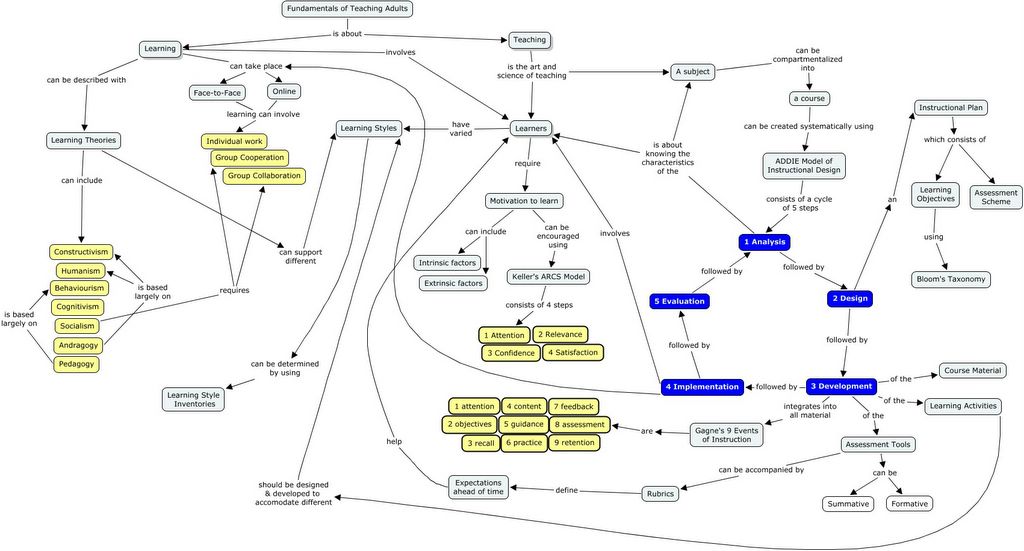
Clearly a student who can prepare a complex concept map showing how parts of the course interrelates with each other is showing understanding of the concepts. It’s an excellent post-learning activity. Another facet of this that I like a lot is that there is an element of creativity built in. It is likely that if you conducted this activity with a large class, that you would get several creative designs to the concept map. As an instructor, examining some of the concept maps created by students might just open new ways of thinking about the material for myself. That can be a wonderful side effect! I’m going to try this in the Fall term with a Chemistry course I’m teaching. I’ll be sure to report back here on how the activity went.
If you have any interesting ideas about concept mapping, feel free to share them in a comment by clicking the ‘comments’ word below.
I really enjoyed the way the way they introduced the use of their concept mapping software of choice: cmap tools. I had never used this free software before and seeing it in action in this setting really peaked my interest. So I downloaded it the next day and I tried it for myself. It really is easy to use. Ellen and Tracy describe many ways in which they used concept mapping to create meaningful learning in their students. The one way that they described that I really liked was to use two concept mapping activities as a way for students to validate their own learning. Prior to a term beginning, or prior to a unit beginning, students are asked to a create a concept map describing what they know about the subject. At the end of the term, or unit, students create a new concept map depicting what they know about the subject. In the second concept mapping exercise, Ellen, Tracy and Margaret invariably see that students demonstrate far more knowledge and that they are able to show relationships between related topics. This rings true to me. I’ve never done a concept mapping exercise as they describe; however, I have used pre- and post-testing and I have seen dramatic results. One of my interests about concept mapping is that this thoughtful, and thought provoking, activity can demonstrate relationships between concepts. It’s not simply a regurgitation of facts. Students must demonstrate higher cognitive levels of thought by analyzing, synthesizing and evaluating the knowledge they have gained during the term or unit.
Just to prove it to myself, I have made two concept maps using the cmaps tools. By the way, they neatly export into JPEG format. Nice! The first concept map would be a typical concept map created by a 1st year university student on the first day of class. The class I taught last Fall was called Fundamentals of Teaching Adults. If I were to give them a short tutorial on what concept mapping was, then give them the title of the course, and then ask them to create a concept map covering the major areas in this course they might come up with something simple like this (click to enlarge):
And at the end of the course, if they were to repeat the exercise they might create concept maps that come closer to this more complicated map (click to enlarge):
Clearly a student who can prepare a complex concept map showing how parts of the course interrelates with each other is showing understanding of the concepts. It’s an excellent post-learning activity. Another facet of this that I like a lot is that there is an element of creativity built in. It is likely that if you conducted this activity with a large class, that you would get several creative designs to the concept map. As an instructor, examining some of the concept maps created by students might just open new ways of thinking about the material for myself. That can be a wonderful side effect! I’m going to try this in the Fall term with a Chemistry course I’m teaching. I’ll be sure to report back here on how the activity went.
If you have any interesting ideas about concept mapping, feel free to share them in a comment by clicking the ‘comments’ word below.
Wednesday, May 31, 2006
Web-based Objectives Builder
When I first started teaching at the post-secondary level I was introduced to Bloom's Taxonomy. It was a rocky relationship in the early days because I really didn't "get it." Once I started designing courses of my own, I realized more and more the importance of using a systematic approach to developing performance-based objectives (e.g., observable and measurable). James Basore from Golden Gate University in San Francisco has developed a Flash-based Tutorial and Web-based tool that can help instructors and course designers to understand how to formulate performance-based objectives using Bloom's Taxonomy. For those that are embarking upon their first course design project, or for those who need a little refresher,this is a great tutorial. Check it out and kudos to James!
Tuesday, May 30, 2006
EduTechnology is Mainstream
Technology that is common to EduTechnologists has been entering the vernacular of mainstream society for years. If you are unconvinced, you could simply turn to these recent vocabulary winners. Do these sound familiar? (*grin*)
People wouldn't bat an eye if they heard this sentence today: "Just Google me to find my Blog and you'll be able to check out my recent Podcast." (*smile*) Five years ago people would have looked at you like you were an alien from another planet if you said that! Things do change quickly don’t they!
- 2002 - Most Useful Word of the Year - by the American Dialect Society - "Google"
- 2004 - Word of the Year - by the Meriam-Webster Dictionary - "Blog"
- 2005 - Word of the Year - by the New Oxford American Dictionary - "Podcast"
People wouldn't bat an eye if they heard this sentence today: "Just Google me to find my Blog and you'll be able to check out my recent Podcast." (*smile*) Five years ago people would have looked at you like you were an alien from another planet if you said that! Things do change quickly don’t they!
Thursday, May 11, 2006
Pre-registration diagnotic testing
Diagnostic testing prior to registration into a credit course is not a new concept. It's probably most well known in the language arts. For example, testing a student on their oral abilities in their second language with a short interview can quickly allow the professor to recommend which level of course to enrol in. In distance education, one can still do this! There are many examples of this and they can vary in technical complexity from simple self-grading of text-based answers to fully automated graded testing including media such as figures and graphs. Either way works well and accomplishes the goal.
For example, visit the DCE050: Essential Writing Skills course description at the Royal Military College of Canada. On this page is a link to a text-based "threshold test" that students take at their own pace and then they download an answer key to self-grade the test. The course administrator then goes on to write: "If you score below 70% (35 out of 50) on this Threshold Test, we recommend that you enrol in DCE 050 – Essential Writing Skills." Simple to use, easy to understand and there is clear criteria that students can self-assess themselves against. The results are never communicated back to the school, are anonymous in every way and the responsibility for enrolling in the course resides with the student.
Another example can be found in the mathematics department of Athabasca University. Called the Mathematics Diagnostic Evaluation, it is an Authorware-based application that delivers three different difficulty categories of mathematics questions. Each question is multiple-choice, and some questions have visual aids such as figures and graphs, etc. Also, instead of guessing when the student doesn't know the answer they may simply click the skip icon. Like the text-based example at the Royal Military College, this test is simple to use (once you have Macromedia Authorware player installed on your machine). At the end of the test the program calculates a student's score and recommends which mathematics course they should begin with. Another strength of the test is that it then allows students to download all the correct answers if they are interested. One weakness I did notice was the lack of published criteria that students can self-assess themselves against. The algorithm of what score ranges result in what course recommendations would be nice to see. Again, like the text-based test discussed previously, the results in this test are never communicated back to the school, are anonymous in every way and the responsibility for enrolling in the course resides with the student.
In my view, although nothing replaces a useful academic counselling session with a real life body (whether face-to-face or on the phone), both of these tests are highly student-centered and can be valuable tools for the learner in planning their choice of courses at a distance.
Tuesday, May 09, 2006
Are you still in the dark about Del.icio.us?
Andy Carvin has written a very readable summary of what Del.icio.us is and how to use it. A must read if you're still in the dark about Del.icio.us. Check it out.
Friday, May 05, 2006
SkypeCasting
Yup.... we've heard of PODcasting... well.... welcome to Skypecasting. I've written about Skype before but there has been a new development. Previous versions of Skype have been limited to 5 users per teleconference; however, the new version is now limited to 100 simultaneous users all being able to access the microphone! WOW! What a mega-teleconference! This is ground breaking in my opinion because it's free. Yup. Free. You could certainly use this in distance education scenarios to host free office hours with the professor or to host a lecture even. Imagine the professor sends out a PowerPoint slide deck to the class and then sets a synchronous time of 10am to meet on Skype. He walks everyone through slide-by-slide using audio and people can ask questions on the fly. Beautiful... and inexpensive!
It's not completely free of bugs as Robin Good reports in a recent product test but the potential to impact distance education especially for small schools with limited budgets is certainly there.
It's not completely free of bugs as Robin Good reports in a recent product test but the potential to impact distance education especially for small schools with limited budgets is certainly there.
Wednesday, May 03, 2006
PODcasting on the Cheap!
I recently went to a talk offered y the University of Hio TeachU series on PODcasting and it really sparked some interest in me. They were DEMOing their PODcasting setup and they also took the opportunity to talk about iTunesU. I've written about that before. I'm going to try to test iTunesU over the summer.... maybe with Janet's help (*grin*) and I'll let people know how I make out. If it's a success I intend to PODcast all my lectures this Fall (*smile*);-)
In the meantime if you need some reading on PODcasting, here is a nice Wiki that contains some great information on the topic: PODcasting on the cheap! You can even join this Wiki and contribute material yourself. Fun!
In the meantime if you need some reading on PODcasting, here is a nice Wiki that contains some great information on the topic: PODcasting on the cheap! You can even join this Wiki and contribute material yourself. Fun!
Tuesday, April 11, 2006
World Lecture Hall
I've written before on Open Courseware Resources and I've recently found a tool that is complimentary: The World Lecture Hall hosted by the University of Texas at Austin.
"World Lecture Hall publishes links to pages created by faculty worldwide who are using the Web to deliver course materials in any language.
Some courses are delivered entirely over the Internet. Others are designed for students in residence. Many fall somewhere in between. In all cases, they can be visited by anyone interested in courseware on the Internet — faculty, developers, and curious students alike."
Try it. It works!!!
Centre for History and New Media and George Mason University
The Centre for History and New Media and George Mason University is something that History experts probably know about; however, for non-history experts like me… it was a really gold mine to find! It’s loaded with interesting tools, resources and projects. It has tools like a Syllabus Finder search engine, timeline creators, and poll creators. It has resources like links to blogs, links to essays on special topics and a searchable database of history departments from around the world. The project section is also jammed packed with goodies. Links to the award-winning history matters site and the 911 Digital Archive are there just to name two.
So if you’re a non-history expert who wants some guidance on what history resources are on the web this is really a one stop shopping experience!
So if you’re a non-history expert who wants some guidance on what history resources are on the web this is really a one stop shopping experience!
Tuesday, March 21, 2006
Boost: A private look into the lives of high school students at risk
I came across this interesting site at http://www.boostup.org that showcases the stories of several high school students at risk of dropping out. The mission of the Boost project is “to create an identity, support and encouragement for those whom might be at risk of dropping out.” The most interesting part of the website to me is the 10 video projects made by high school seniors. They are pretty raw in production and they do a great job of communicating to the viewer the personal challenges that each student faces in grade 12. Most of the students are in large urban centers such as Los Angeles, Miami and Brooklyn and some of their videos demonstrate that their environment is a significant detractor to their goals to be successful in school. If you’re an educator at any level, take the time to watch these short videos. They can really bring a dose of reality to your work. Note that you must have Flash Player installed to view the videos.
Friday, March 17, 2006
The Canadian Public Domain Registry is conceived!
Access Copyright, formerly known as CanCopy, is the Canadian copyright licensing agency. In a collaboration with Creative Commons Canada and with the assistance of the makers of Wikipedia, they announced on March 3rd the development of a Canadian public domain registry. This project will create an online, searchable catalogue of published works that are in the Canadian public domain. In their press release, Access Copyright does not provide a target release date... so keeep your eyes peeled for the registry's arrival in the future! This registry will an invaluable resource to instructional designers and educators in Canada.
Friday, February 24, 2006
eLearning 2.0: what does the future hold?
Answer: I don't know.
But lots of people are talking about it. Tony Karrer recently asked me to take a peak at his blog located at http://elearningtech.blogspot.com/ and he's been talking about e-Learning 2.0 quite a bit!
For example, he states that e-Learning 2.0 is trending towards: “small pieces of content, delivered closer to time / place of work, and likely delivered in pieces over time as part of a larger program.” I think he is "bang on" in my view. This statement makes me remember back to what the manufacturing sector experienced in the 1980s where much of the sector transformed to a Just-In-Time (JIT) inventory model in order to maximize efficiency. In the future, I see training establishments now moving to more a more effective, e-Learning 2.0, model where staff are delivered training only at the moment they need it for their job performance (i.e. JIT!), that the training be in small pieces that are not intermingled with other less-relevant content, that they receive the training while on the job, via their own workstation, that there be permanent access to the training resources to act as a job aid and that this job aid be centrally updated for all employees in the future should any processes/policies change/improve. To me the job aid aspect of training is very crucial and I think the ease with which electronic materials can be updated centrally lends itself very well to this.
Monday, February 13, 2006

Monday, February 06, 2006
Do instructional designers in the trenches really need to know about things like Web 2.0 right now?
Jay Cross suggested some web competencies that generalist instructional designers should have. A couple of them surprise me because they are very specific technology issues. For example, he lists "Web 2.0" as one issue. Personaly, I am not convinced a generalist instructioanl designer has to worry about Web 2.0 at this time. I think that generalist instructional designers should try to focus on general issues around instructional design and project management, and that they should strive to work within multidisciplinary teams where the computer technologists on the team are well versed on the more specific technology-ladden concepts. I've written about this before. If you'd like to check out Jay's list of competencies, here's the link. Many of them are quite good!
Thursday, January 26, 2006
iTunes U
Are you an educator that sees value in recording or taping your lectures or demonstrations and making them available to your students? Be it video or audio, you can now do it easily with Apple’s new service: iTunes U. It’s a no cost hosted service that allows educators to post their recorded media files and make them available over the Internet to their students. Students can listen or view the material directly on their computers, or if they have iPods, they can seamlessly download your media to their iPod using the Apple iTunes software. Note that only those lucky students with video iPod can view your video content on their portable device. From their iPod they can listen and/or view your material 24/7 anywhere they go! Now that scores big points for accessibility.
Some people reading this may note that any good LMS such as WebCT, D2L, or Sakai, can also host audio and video files, so what’s the advantage of using iTunes U if your educational institution has an LMS? The advantage is that the bandwidth requirement is displaced from your school’s LMS server to Apple’s server. That can make a big difference in server performance with large audio and video files. You can alleviate some of the bandwidth pressures on your local institution’s LMS server by displacing the bandwidth requirement to Apple’s server. Obviously, if your school doesn’t have an LMS, iTunes U looks very attractive indeed!
Some people reading this may note that any good LMS such as WebCT, D2L, or Sakai, can also host audio and video files, so what’s the advantage of using iTunes U if your educational institution has an LMS? The advantage is that the bandwidth requirement is displaced from your school’s LMS server to Apple’s server. That can make a big difference in server performance with large audio and video files. You can alleviate some of the bandwidth pressures on your local institution’s LMS server by displacing the bandwidth requirement to Apple’s server. Obviously, if your school doesn’t have an LMS, iTunes U looks very attractive indeed!
Tuesday, January 17, 2006
Why Skype is getting lots of Hype
It was my Dad's birthday this week; he's 62 years old. He and I don't live in the same city and we see each other only a hand full of times each year. I spoke to him to wish him happy birthday and he's doing well. I called him from my home, I have no land telephone line and my cell phone was dead. So instead, I used Skype. It's a piece of software that allows free voice transmission over the Internet and it’s from the makers of the infamous KaZaa! But don’t let that dissuade you from trying it. It's incredibly easy to use... anyone with a high-speed Internet connection and a headset can use it. The clarity is phenomenal and far outweighs the audio transmission possible over other popular instant messaging services such as MSN or ICQ.
So what does this topic have to do with e-education? Well, I think Skype can be used as a no-cost method of increasing student-to-student interaction at a distance so that they can work collaboratively as a team. For those students who enjoy a bit of synchronous interaction with their team members that extends above and beyond conventional text-based chat, this could work very well. In fact, a teleconference with multiple participants can be undertaken with the newest versions of Skype. Because it's so easy to use, has no cost associated with it, and has excellent audio quality, Skype is getting lots of hype! Try it. You might just like the impact it has on your long distance bill as well.
So what does this topic have to do with e-education? Well, I think Skype can be used as a no-cost method of increasing student-to-student interaction at a distance so that they can work collaboratively as a team. For those students who enjoy a bit of synchronous interaction with their team members that extends above and beyond conventional text-based chat, this could work very well. In fact, a teleconference with multiple participants can be undertaken with the newest versions of Skype. Because it's so easy to use, has no cost associated with it, and has excellent audio quality, Skype is getting lots of hype! Try it. You might just like the impact it has on your long distance bill as well.
5000+ Hits!
It's a new record! The last 1,000 hits only took 10 weeks to achieve! It took 15 weeks to move from 2,000 to 3,000 hits and 14 weeks to move from 3,000 to 4,000 hits. Nice!
Subscribe to:
Posts (Atom)


